Notes
Vim Configuration from Minimal to Complete
From a configuration that works on low-resource, restricted permissions environments, to a complete configuration…
And from almost scratch. Because I like to know what’s in my .vimrc.
TL;DR the final vimrc and at the different steps is in this repository, with tags for each step.
Vim rocks 🤘! And recent plugins can make it really great for coding, most notably using Conquer of Completion with NodeJS, that has a bunch of extensions for a lot of languages using the Language Server Protocol.
In this article however, we’ll assume to be working on a low resource computer, or limited in what can be installed, runtimes available, etc. So code completion, linting, quality without external runtimes!
I’ll use this GitHub repository and tags for each steps in ths article.
- Vim Configuration from Minimal to Complete
- Minimal Configuration
- Adding Plugins
- Conclusion
You can apply the diffs in this post by copying them in a file, let’s say example.patch, and apply them, as long as you have the same directory structure as in my GitHub repository, and run $ git apply example.patch.
Minimal Configuration
Let’s create a minimal vimrc file with some basic configuration we need.
- As a base, we’ll take the content of Tim Pope’s vim-sensible plugin
- Now we have in tag 0.1.0 our minimal vimrc as recommended
" sensible.vim - Defaults everyone can agree on " Maintainer: Tim Pope <http://tpo.pe/> " Version: 1.2 if exists('g:loaded_sensible') || &compatible finish else let g:loaded_sensible = 'yes' endif if has('autocmd') filetype plugin indent on endif if has('syntax') && !exists('g:syntax_on') syntax enable endif " Use :help 'option' to see the documentation for the given option. set autoindent set backspace=indent,eol,start set complete-=i set smarttab set nrformats-=octal if !has('nvim') && &ttimeoutlen == -1 set ttimeout set ttimeoutlen=100 endif set incsearch " Use <C-L> to clear the highlighting of :set hlsearch. if maparg('<C-L>', 'n') ==# '' nnoremap <silent> <C-L> :nohlsearch<C-R>=has('diff')?'<Bar>diffupdate':''<CR><CR><C-L> endif set laststatus=2 set ruler set wildmenu if !&scrolloff set scrolloff=1 endif if !&sidescrolloff set sidescrolloff=5 endif set display+=lastline if &encoding ==# 'latin1' && has('gui_running') set encoding=utf-8 endif if &listchars ==# 'eol:$' set listchars=tab:>\ ,trail:-,extends:>,precedes:<,nbsp:+ endif if v:version > 703 || v:version == 703 && has("patch541") set formatoptions+=j " Delete comment character when joining commented lines endif if has('path_extra') setglobal tags-=./tags tags-=./tags; tags^=./tags; endif if &shell =~# 'fish$' && (v:version < 704 || v:version == 704 && !has('patch276')) set shell=/usr/bin/env\ bash endif set autoread if &history < 1000 set history=1000 endif if &tabpagemax < 50 set tabpagemax=50 endif if !empty(&viminfo) set viminfo^=! endif set sessionoptions-=options set viewoptions-=options " Allow color schemes to do bright colors without forcing bold. if &t_Co == 8 && $TERM !~# '^Eterm' set t_Co=16 endif " Load matchit.vim, but only if the user hasn't installed a newer version. if !exists('g:loaded_matchit') && findfile('plugin/matchit.vim', &rtp) ==# '' runtime! macros/matchit.vim endif if empty(mapcheck('<C-U>', 'i')) inoremap <C-U> <C-G>u<C-U> endif if empty(mapcheck('<C-W>', 'i')) inoremap <C-W> <C-G>u<C-W> endif " vim:set ft=vim et sw=2:- Note that we could have used this plugin as explained in the installation. But
- it makes for a great base
- We’re trying to use the less possible plugins at the beginning, then build upon it
- Anecdote: the toolkit for ocaml developers does that same thing (only with an earlier version of the plugin) with
opam user-setup install, and adds some ocaml related stuff below this plugin’s code. You can check out the vimrc generated by user-setup
- Now some options of my own blend or gotten from some good vimrc around. Here’s what I’ve added. Highlighting, tab settings, remap the leader key, and functions to know which OS we’re using. Complete code in the 0.2.0 tag
  diff --git a/.gitignore b/.gitignore
  new file mode 100644
  index 0000000..a01ee28
  --- /dev/null
  +++ b/.gitignore
  @@ -0,0 +1 @@
  +.*.swp
  diff --git a/.vimrc b/.vimrc
  index 0818853..302d55b 100644
  --- a/.vimrc
  +++ b/.vimrc
  @@ -1,3 +1,12 @@
  +" Modeline and Notes {
  +" vim: set sw=4 ts=4 sts=4 et tw=78 foldmarker={,} foldlevel=0 foldmethod=marker spell:
  +"
  +" @ThomasAlcala's vim configuration.
  +" }
  +"
  +"
  +set nocompatible
  +
  " sensible.vim - Defaults everyone can agree on
  " Maintainer:   Tim Pope <http://tpo.pe/>
  " Version:      1.2
  @@ -99,3 +108,41 @@ if empty(mapcheck('<C-W>', 'i'))
  endif

  " vim:set ft=vim et sw=2:
  +
  +" -----------
  +" Environment
  +" -----------
  +
  +" Encoding
  +set encoding=utf-8
  +set fileencoding=utf-8
  +set fileencodings=utf-8
  +set ttyfast
  +
  +" Tabs. May be overridden by autocmd rules
  +set tabstop=4
  +set softtabstop=0
  +set shiftwidth=4
  +set expandtab
  +
  +" Map leader to ,
  +let mapleader=','
  +
  +" Enable hidden buffers
  +set hidden
  +
  +" Searching
  +set hlsearch
  +set incsearch
  +set ignorecase
  +set smartcase
  +
  +silent function! OSX()
  +    return has('macunix')
  +endfunction
  +silent function! LINUX()
  +    return has('unix') && !has('macunix') && !has('win32unix')
  +endfunction
  +silent function! WINDOWS()
  +    return  (has('win32') || has('win64'))
  +endfunction
With that done, we now have autocompletion working with
ctrl+nin insert mode.And now some built in language support with omnifunc with
ctrl-x ctrl-o(not very user-friendly), as in the 0.2.1 tag:diff --git a/.vimrc b/.vimrc index 302d55b..77bfe70 100644 --- a/.vimrc +++ b/.vimrc @@ -146,3 +146,5 @@ endfunction silent function! WINDOWS() return (has('win32') || has('win64')) endfunction + +set omnifunc=syntaxcomplete#CompleteA trick for tab completion is to add a smart function like below, you can also find it in the 0.2.2 tag:
  diff --git a/.vimrc b/.vimrc
  index 77bfe70..7f727b8 100644
  --- a/.vimrc
  +++ b/.vimrc
  @@ -148,3 +148,28 @@ silent function! WINDOWS()
  endfunction

  set omnifunc=syntaxcomplete#Complete
  +
  +" Smart mapping for tab completion
  +" https://vim.fandom.com/wiki/Smart_mapping_for_tab_completion
  +function! Smart_TabComplete()
  +  let line = getline('.')                         " current line
  +
  +  let substr = strpart(line, -1, col('.')+1)      " from the start of the current
  +                                                  " line to one character right
  +                                                  " of the cursor
  +  let substr = matchstr(substr, "[^ \t]*$")       " word till cursor
  +  if (strlen(substr)==0)                          " nothing to match on empty string
  +    return "\<tab>"
  +  endif
  +  let has_period = match(substr, '\.') != -1      " position of period, if any
  +  let has_slash = match(substr, '\/') != -1       " position of slash, if any
  +  if (!has_period && !has_slash)
  +    return "\<C-X>\<C-P>"                         " existing text matching
  +  elseif ( has_slash )
  +    return "\<C-X>\<C-F>"                         " file matching
  +  else
  +    return "\<C-X>\<C-O>"                         " plugin matching
  +  endif
  +endfunction
  +
  +inoremap <tab> <c-r>=Smart_TabComplete()<CR>
Check out
:help ins-completionfor a list of completion commands.
Adding Plugins
With vim 7.4, there was some tuning to do to manage the runtime path, that’s why there are a bunch of plugin managers out there, like the minimalistic, solid vim-pathogen by Tim Pope (again!), vundle, then asynchronous and fast dein, and my favorite Vim-Plug.
Since vim 8, there’s a /pack/ (think backslashes for Windows) directory in your vim files (~/.vim/ for linux and Mac OS, ~\vimfiles\ for Windows) where you can clone, submodule, or simply copy plugins that will be loaded on vim startup.
I’ll demonstrate and put the code here using the package path and with Vim-Plug, but if you like another plugin manager, it’s usually pretty simple to move from one to the other, they usually use the same pattern:
call#open
  plugin '<plugin path>'
  plugin '<plugin path>'
  plugin '<plugin path>'
call#close
If you are not sure vhether your vim supports packages, try typing :echo has('packages') in vim, it should display 1.
I recommend using a plugin manager. I like Vim-Plug because of how fast it is to fetch things asynchronously, and the options to run an installation script that you won’t have using the vendor thing. And pathogen for it’s simplicity. On old OS with vim 7.4, maybe go for vim-pathogen.
Plugin Initialization
Everything from here will be branched. So this is what the tags look like so far in the repository:
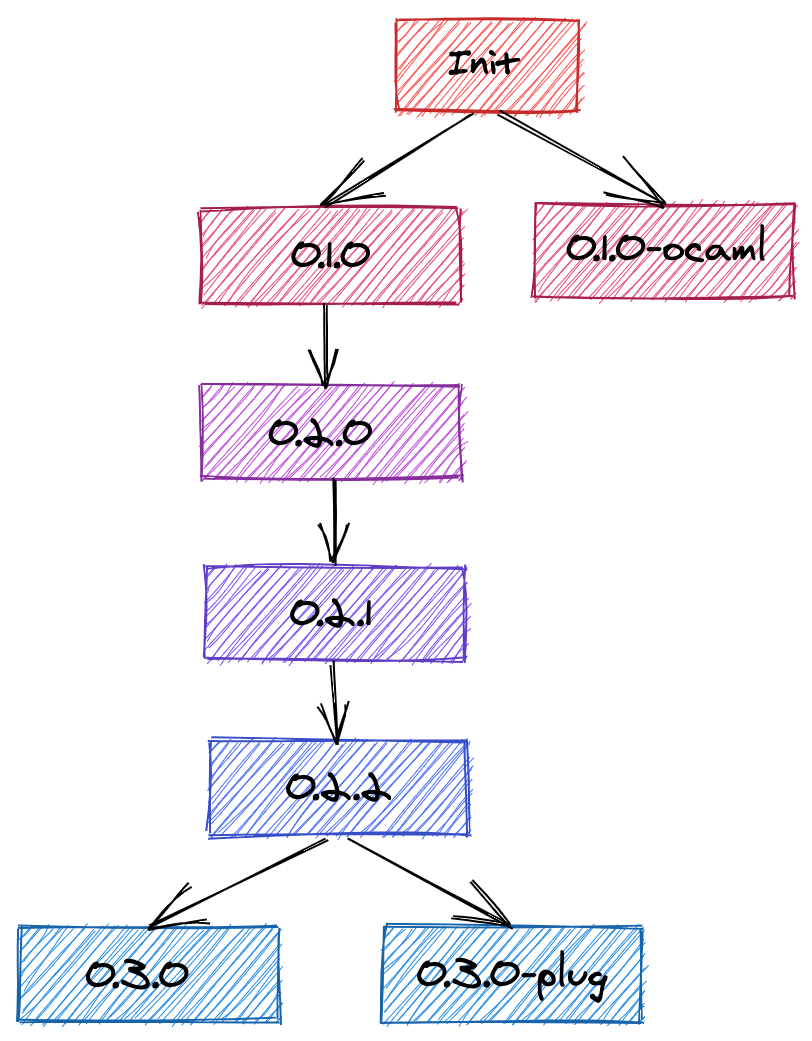
Vim Packages
Here’s the initialization, I am also adding the scripts in the repository’s bin folder. You can find the text in the .vimrc file so far on the 0.3.0 tag
#!/usr/bin/env bash

if [ ! -d "$HOME/.vim/pack/bundle/start" ]; then
    mkdir -p ~/.vim/pack/bundle/start
fi

cd ~/.vim/pack/bundle/start
Vim-Plug
- Install Vim-Plug using the instructions for your OS, following the official instructions
- Call and close plug in the
.vimrcfile: ```diff diff –git a/.vimrc b/.vimrc index 7f727b8..143e7d2 100644 — a/.vimrc +++ b/.vimrc @@ -173,3 +173,9 @@ function! Smart_TabComplete() endfunction
inoremap
  Find this content [the 0.3.0-plug tag](https://github.com/ThomasMarcel/vimrc/blob/0.3.0-plug/.vimrc).

## General Developer Experience (DX) Plugins

Now, let's add some cool DX plugins (let me know if I am missing some)

* [vim-sensible](https://github.com/tpope/vim-sensible) (we started our `.vimrc` file with that, so not mandatory, but like that it'll be up to do date)
* [mucomplete](https://github.com/lifepillar/vim-mucomplete) for code completion. Note that to use it properly, we need to remove the mapping for the tab key. And it is "better" than our omnifunc because it will check the language completion, then the tags, etc automatically in one command
* [vim-fugitive](https://github.com/tpope/vim-fugitive) git wrapper
* [vim-commentary](https://github.com/tpope/vim-commentary) comment stuff out
* [vim-surround](https://github.com/tpope/vim-surround) manipulate enclosing characters, tags, etc
* [vim-vinegar](https://github.com/tpope/vim-vinegar) to move around from buffer to netrw (vim's directory browser)
* [vim-sleuth](https://github.com/tpope/vim-sleuth) to set indentation
* [vim-obsession](https://github.com/tpope/vim-obsession) vim session autosave and other session-related things
* [delimitmate](https://github.com/raimondi/delimitmate) to automatically close quotes, etc
* [ctrlp.vim](https://github.com/ctrlpvim/ctrlp.vim) search for a file

### Vim Packages

I modified my script to clone repositories to not become very repetitive, and commented out the tab key mapping to avoid conflict with mucomplete. Find the code in [the 0.4.0 tag](https://github.com/ThomasMarcel/vimrc/tree/0.4.0).

```diff
diff --git a/.vimrc b/.vimrc
index 7f727b8..65a4c7a 100644
--- a/.vimrc
+++ b/.vimrc
@@ -148,6 +148,7 @@ silent function! WINDOWS()
 endfunction

 set omnifunc=syntaxcomplete#Complete
+set spell

 " Smart mapping for tab completion
 " https://vim.fandom.com/wiki/Smart_mapping_for_tab_completion
@@ -172,4 +173,4 @@ function! Smart_TabComplete()
   endif
 endfunction

-inoremap <tab> <c-r>=Smart_TabComplete()<CR>
+" inoremap <tab> <c-r>=Smart_TabComplete()<CR>
diff --git a/bin/plugins.sh b/bin/plugins.sh
old mode 100644
new mode 100755
index 23d88c2..ab903ec
--- a/bin/plugins.sh
+++ b/bin/plugins.sh
@@ -6,4 +6,15 @@ fi

 cd ~/.vim/pack/bundle/start

-git clone --depth 1 https://github.com/lifepillar/vim-mucomplete.git
+git_plugins=( "tpope/vim-sensible" "lifepillar/vim-mucomplete" "tpope/vim-fugitive" "tpope/vim-commentary" "tpope/vim-surround" "tpope/vim-vinegar" "tpope/vim-sleuth" "tpope/vim-obsession" "raimondi/delimitmate" "ctrlpvim/ctrlp.vim" )
+
+for plugin in "${git_plugins[@]}"; do
+    folder=$(echo $plugin | cut -d'/' -f2)
+    if [ ! -d "$folder" ]; then
+        git clone --depth 1 "https://github.com/$plugin.git"
+    else
+        cd "$folder"
+        git fetch origin
+        cd ..
+    fi
+done
Vim-Plug
The results can be found in the 0.4.0-plug tag.
diff --git a/.vimrc b/.vimrc
index 143e7d2..bcb980d 100644
--- a/.vimrc
+++ b/.vimrc
@@ -148,6 +148,7 @@ silent function! WINDOWS()
 endfunction

 set omnifunc=syntaxcomplete#Complete
+set spell

 " Smart mapping for tab completion
 " https://vim.fandom.com/wiki/Smart_mapping_for_tab_completion
@@ -172,10 +173,19 @@ function! Smart_TabComplete()
   endif
 endfunction

-inoremap <tab> <c-r>=Smart_TabComplete()<CR>
+" inoremap <tab> <c-r>=Smart_TabComplete()<CR>

 call plug#begin('~/.vim/plugged')

-" Put plugins here
+Plug 'tpope/vim-sensible'
+Plug 'lifepillar/vim-mucomplete'
+Plug 'tpope/vim-fugitive'
+Plug 'tpope/vim-commentary'
+Plug 'tpope/vim-surround'
+Plug 'tpope/vim-vinegar'
+Plug 'tpope/vim-sleuth'
+Plug 'tpope/vim-obsession'
+Plug 'raimondi/delimitmate'
+Plug 'ctrlpvim/ctrlp.vim'

 call plug#end()
Linter and Fixer
First let’s get the package.
- ale is my favorite. Works really fine, is pretty fast and asynchronous, so not frustrating.
There’s a bit of configuration to do for the fixers. And you can optionally add let g:ale_fix_on_save = 1 to automatically fix on save.
We are also adding some general fixes for all file types: remove trailing lines and whitespaces.
diff --git a/.vimrc b/.vimrc
index 65a4c7a..7711a6a 100644
--- a/.vimrc
+++ b/.vimrc
@@ -174,3 +174,9 @@ function! Smart_TabComplete()
 endfunction

 " inoremap <tab> <c-r>=Smart_TabComplete()<CR>
+
+let g:ale_fixers = {
+\   '*': ['remove_trailing_lines', 'trim_whitespace'],
+\}
+
+let g:ale_fix_on_save = 1
Vim Packages
Let’s get the package (cf. tag 0.5.0).
diff --git a/.vimrc b/.vimrc
index 65a4c7a..7711a6a 100644
--- a/.vimrc
+++ b/.vimrc
@@ -174,3 +174,9 @@ function! Smart_TabComplete()
 endfunction

 " inoremap <tab> <c-r>=Smart_TabComplete()<CR>
+
+let g:ale_fixers = {
+\   '*': ['remove_trailing_lines', 'trim_whitespace'],
+\}
+
+let g:ale_fix_on_save = 1
diff --git a/bin/plugins.sh b/bin/plugins.sh
index ab903ec..3b87ba4 100755
--- a/bin/plugins.sh
+++ b/bin/plugins.sh
@@ -8,6 +8,8 @@ cd ~/.vim/pack/bundle/start

 git_plugins=( "tpope/vim-sensible" "lifepillar/vim-mucomplete" "tpope/vim-fugitive" "tpope/vim-commentary" "tpope/vim-surround" "tpope/vim-vinegar" "tpope/vim-sleuth" "tpope/vim-obsession" "raimondi/delimitmate" "ctrlpvim/ctrlp.vim" )

+linter_plugins=( "dense-analysis/ale" )
+
 for plugin in "${git_plugins[@]}"; do
     folder=$(echo $plugin | cut -d'/' -f2)
     if [ ! -d "$folder" ]; then
@@ -18,3 +20,14 @@ for plugin in "${git_plugins[@]}"; do
         cd ..
     fi
 done
+
+for plugin in "${linter_plugins[@]}"; do
+    folder=$(echo $plugin | cut -d'/' -f2)
+    if [ ! -d "$folder" ]; then
+        git clone --depth 1 "https://github.com/$plugin.git"
+    else
+        cd "$folder"
+        git fetch origin
+        cd ..
+    fi
+done
Vim-Plug
Now we add the plugin with vim-plug, and the same bit of configuration as mentioned before. Tag 0.5.0-plug.
diff --git a/.vimrc b/.vimrc
index bcb980d..109ec2f 100644
--- a/.vimrc
+++ b/.vimrc
@@ -188,4 +188,12 @@ Plug 'tpope/vim-obsession'
 Plug 'raimondi/delimitmate'
 Plug 'ctrlpvim/ctrlp.vim'

+Plug 'dense-analysis/ale'
+
 call plug#end()
+
+let g:ale_fixers = {
+\   '*': ['remove_trailing_lines', 'trim_whitespace'],
+\}
+
+let g:ale_fix_on_save = 1
Language-specific configuration and plugins
Linting configuration
Installed linters for your language of preference should work out of the box, and fixers too within the available commands, unless specified otherwise.
To see what linters and fixers are available end enabled, open a file of the type you want, and write :ALEInfo. At the top, you will see something like the following:
 Current Filetype: rust
Available Linters: ['analyzer', 'cargo', 'rls', 'rustc']
  Enabled Linters: ['cargo', 'rls']
  Ignored Linters: []
 Suggested Fixers:
  'remove_trailing_lines' - Remove all blank lines at the end of a file.
  'rustfmt' - Fix Rust files with Rustfmt.
  'trim_whitespace' - Remove all trailing whitespace characters at the end of every line.
And from this info, you can also see the output of the command, so if a linter or fixer isn’t behaving like it should, check its output in :ALEInfo and debug!
The .vimrc looks like this in tags 0.6.0 and 0.6.0-plug, respectively.
  diff --git a/.vimrc b/.vimrc
index 7711a6a..9535a37 100644
--- a/.vimrc
+++ b/.vimrc
@@ -64,7 +64,7 @@ if &listchars ==# 'eol:$'
   set listchars=tab:>\ ,trail:-,extends:>,precedes:<,nbsp:+
 endif

-if v:version > 703 || v:version == 703 && has("patch541")
+if v:version > 703 || v:version == 703 && has('patch541')
   set formatoptions+=j " Delete comment character when joining commented lines
 endif

@@ -96,7 +96,7 @@ if &t_Co == 8 && $TERM !~# '^Eterm'
 endif

 " Load matchit.vim, but only if the user hasn't installed a newer version.
-if !exists('g:loaded_matchit') && findfile('plugin/matchit.vim', &rtp) ==# ''
+if !exists('g:loaded_matchit') && findfile('plugin/matchit.vim', &runtimepath) ==# ''
   runtime! macros/matchit.vim
 endif

@@ -175,8 +175,36 @@ endfunction

 " inoremap <tab> <c-r>=Smart_TabComplete()<CR>

+augroup FiletypeGroup
+    autocmd!
+    au BufNewFile,BufRead *.jsx set filetype=javascript.jsx
+augroup END
+
+let g:ale_linter_aliases = {
+            \ 'jsx': ['css', 'javascript'],
+            \ 'vue': ['eslint', 'vls']
+            \}
+
+let g:ale_linters = {
+            \ 'jsx': ['stylelint', 'eslint'],
+            \ 'rust': ['analyzer', 'cargo', 'rls'],
+            \ 'vim': ['vint'],
+            \ 'zsh': ['shell', 'shellcheck'],
+            \}
+
 let g:ale_fixers = {
-\   '*': ['remove_trailing_lines', 'trim_whitespace'],
-\}
+            \ '*': ['remove_trailing_lines', 'trim_whitespace'],
+            \ 'rust': ['rustfmt'],
+            \}

 let g:ale_fix_on_save = 1
+
+let g:ale_sign_column_always = 1
+let g:ale_echo_msg_error_str = 'E'
+let g:ale_echo_msg_warning_str = 'W'
+let g:ale_echo_msg_format = '[%linter%] %s [%severity%]'
+let g:ale_lint_on_insert_leave = 0
+let g:ale_set_loclist = 1
+let g:ale_set_quickfix = 1
+let g:ale_open_list = 1
+let g:ale_list_window_size = 5
So mainly what was done here is:
- set
*.jsxfiles to typejavascript.jsx, easier to identify as javascript - set aliases for jsx and vue files
- set specific linters instead of default ones for a few types
- same with fixers
- leave the “gutter” (1 character column on the left) that ale uses always open, so the buffer window isn’t always tilting from left to right
- set the message format to know what type of message it is, and coming from which linter, as we can have several for one file type
- Open the quickfix window so it’s easier to navigate warnings and errors, but not too big (in my opinion, the default 10 lines are obtrusive, specially in split views. 5 is fine)
Language plugins
For better syntax highlighting and other functions, sometimes the default language support offered by vim out of the box is supbar or non-existant. In that case, there are several options to consider:
- VimAwesome, look in the language menu, there are a lot of tags. you can checkout the plugins by language
- vim-polyglot offers support for a lot of different languages with their own official and/or community plugins. Look at the language pack list to see if the programming language you wans is in the list (it probably is). And it loads them on demand, so it’s not slowing down vim performances
- Language packs. So here, you have to look for them one by one, depending on the languages you use. Sometimes, the official website or official organization in GitHub or such offers a plugin, like Rust or Rescript. Sometimes you will have to search for “javascript vim” or something, and check out the results. The vim-polyglot language package list is also a good starting point to search for a specific language
Colors and Themes
Now there’s a saying in French that goes like “Des goûts et des couleurs, on ne discute pas”. Literal translation being “of tastes and colors, we don’t discuss”.
So here I’ll just drop a basic configuration, one plugin I like, to easily switch between themes, and a bunck of themes I like.
Mostly dark. Cuz most developers have some common traits with vampires. Like hating light, not living the healthiest of lives. Some hate garlic, I guess. And now (03/06/2021) we can’t cross seas, but that’s valid for most of the human condition, not only vampires and developers. And developires.
Let’s take an example with the famous solarized8 color theme.
Basically, we get the plugin, set the colorscheme variable, background tone (light/dark).
Optional: for a GUI, we can add a font. Mine is Dank Mono. It’s not free, but there are a lot of cool free fonts too. Check out Dev Fonts to see which one lookgs good.
You can find a list of popular color schemes at VimAwesome.
Vim Packages
You can see the results in tag 0.7.0 for the install script, tag 0.8.0 for the .vimrc.
diff --git a/.vimrc b/.vimrc
index 9535a37..373d076 100644
--- a/.vimrc
+++ b/.vimrc
@@ -148,7 +148,7 @@ silent function! WINDOWS()
 endfunction

 set omnifunc=syntaxcomplete#Complete
-set spell
+" set spell

 " Smart mapping for tab completion
 " https://vim.fandom.com/wiki/Smart_mapping_for_tab_completion
@@ -208,3 +208,15 @@ let g:ale_set_loclist = 1
 let g:ale_set_quickfix = 1
 let g:ale_open_list = 1
 let g:ale_list_window_size = 5
+
+set background=dark
+colorscheme solarized8
+if has('gui_running')
+  if has('gui_gtk2')
+    set guifont=Dank\ Mono\ Regular:h12
+  elseif has('gui_macvim')
+    set guifont=Dank\ Mono\ Regular:h12
+  elseif has('gui_win32')
+    set guifont=Dank\ Mono\ Regular:h12
+  endif
+endif
diff --git a/bin/plugins.sh b/bin/plugins.sh
index 3b87ba4..38b9e9c 100755
--- a/bin/plugins.sh
+++ b/bin/plugins.sh
@@ -10,6 +10,8 @@ git_plugins=( "tpope/vim-sensible" "lifepillar/vim-mucomplete" "tpope/vim-fugiti

 linter_plugins=( "dense-analysis/ale" )

+color_plugins=( "lifepillar/vim-solarized8" )
+
 for plugin in "${git_plugins[@]}"; do
     folder=$(echo $plugin | cut -d'/' -f2)
     if [ ! -d "$folder" ]; then
@@ -31,3 +33,14 @@ for plugin in "${linter_plugins[@]}"; do
         cd ..
     fi
 done
+
+for plugin in "${color_plugins[@]}"; do
+    folder=$(echo $plugin | cut -d'/' -f2)
+    if [ ! -d "$folder" ]; then
+        git clone --depth 1 "https://github.com/$plugin.git"
+    else
+        cd "$folder"
+        git fetch origin
+        cd ..
+    fi
+done
Vim-Plug
The tag 0.8.0-plug adds the colorscheme in the vim-plug branch.
diff --git a/.vimrc b/.vimrc
index 2844774..e3843a2 100644
--- a/.vimrc
+++ b/.vimrc
@@ -190,6 +190,8 @@ Plug 'ctrlpvim/ctrlp.vim'

 Plug 'dense-analysis/ale'

+Plug 'lifepillar/vim-solarized8'
+
 call plug#end()

 augroup FiletypeGroup
@@ -226,3 +228,15 @@ let g:ale_set_loclist = 1
 let g:ale_set_quickfix = 1
 let g:ale_open_list = 1
 let g:ale_list_window_size = 5
+
+set background=dark
+colorscheme solarized8
+if has('gui_running')
+  if has('gui_gtk2')
+    set guifont=Dank\ Mono\ Regular:h12
+  elseif has('gui_macvim')
+    set guifont=Dank\ Mono\ Regular:h12
+  elseif has('gui_win32')
+    set guifont=Dank\ Mono\ Regular:h12
+  endif
+endif
Extras
So now we have a pretty decent configuration. But there are still some plugins that are good to have:
- vim-seasy-align easily align things
- vim-visual-multi for multi selectors
- goyo.vim distraction-free mode
- limelight.vim focus on current paragraph, dim the rest (cool with goyo)
- lightline.vim status bar
- devicons file, scm icons
- startify cool vim startup page, with recent files and a quote
- any-jump.vim jump to definition
- vim-highlightedyank to highlight the yaked text for a sec
- vim-thematic to switch between themes
- vim-gitgutter to display git information in the “gutter”
- ultisnips vim snippets engine
- vim-snippets actual snippets
Authoring
I’ve written an article abouth authoring with vim, all the plugins for completion and spelling, and some goodies.
More
Plugins
Visit VimAwesome for a list of popular vim plugins
Dotfiles and vimrc generators
There are several dotfiles from developers that you can find on GitHub. And there’s Vim Bootstrap and other .vimrc generators.
Conclusion
I hope this will help you. This is also part of a thought process that I went through to cleanup my own .vimrc, and know it better.
The .vimrc at that point is located in tag 1.0.0 and 1.0.0-plug. I will write separate posts for the programming languages I use.
Let me know what you think!
And note so self: write smaller articles but more often 😅.